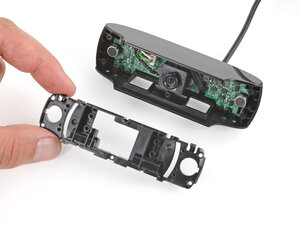
Fixing C920 Blurry Image & Stuck Macro Focus (Lens Ring Misalignment)

crwdns2935091:0crwdnd2935091:0crwdne2935091:0
The Logitech C920 is a widely used external webcam designed for high-quality video conferencing and content creation. It features a durable polycarbonate housing with a reinforced metal-clamp hinge and a multi-element glass lens to improve clarity and longevity. Key features include Full HD 1080p video at 30 fps, H.264 hardware encoding, autofocus, and dual stereo microphones. The unit mounts with a universal clip and includes a tripod thread for stable studio setups.
The Logitech C920 can be identified by the model number (M/N VU0062). The model label is on the underside of the camera near the USB cable exit. This label lists the model (M/N), part (P/N), and serial (S/N) numbers.
Common repair-relevant faults include no video output (often caused by a damaged USB cable or failed USB controller), persistent autofocus/haze (dirty or damaged lens or autofocus actuator fault), and microphone failure (loose internal connection). Diagnose by testing the camera on another computer/port, inspecting and continuity-testing the cable, checking the lens for contamination or mechanical obstruction, and verifying microphone input in OS audio settings.
For additional troubleshooting help, visit: Visit https://support.logi.com for drivers, downloads, and support articles for C920/C920s.
Limited hardware warranty varies by region (commonly 1 year). Check Logitech support for region-specific terms.
crwdns2936751:024crwdne2936751:0 4
crwdns2936753:07crwdne2936753:0 22
crwdns2936753:030crwdne2936753:0 84
crwdns2959996:0crwdne2959996:0 762