
Battery
|
crwdns2933313:01crwdne2933313:0 crwdns2934263:00crwdne2934263:0 |
Why isn't the screen responding to the stylus pen? |
|
crwdns2933315:02crwdne2933315:0 crwdns2934263:00crwdne2934263:0 |
Where can I find the model number for my LeapPad tablet? |
|
crwdns2933313:01crwdne2933313:0 crwdns2934263:01crwdne2934263:0 |
How can I sync music to my LeapPad 2? |
|
crwdns2933313:01crwdne2933313:0 crwdns2934263:01crwdne2934263:0 |
Leappad 2 is stuck on tuning up |
crwdns2935065:0crwdne2935065:0
The LeapPad 2 was released in the summer of 2012, and is the 10th iteration of LeapFrog's LeapPad educational tablet series. It is aimed at users aged 3-9.
The LeapPad 2 has a 5-inch touch screen color display. It supports tap, flick, and drag actions. It also has animation capabilities along with a built-in speaker and a microphone. The LeapPad 2 has 4GB of memory, up to 9 hours of battery life, and a USB cable to connect to a computer.
The LeapPad 2 was replaced in the summer of 2013 by the LeapPad Ultra.
The LeapPad 2 can be distinguished from earlier versions by its front- and rear-facing cameras. The original LeapPad only included a rear-facing camera. The RAM was also increased from 2 GB to 4 GB.
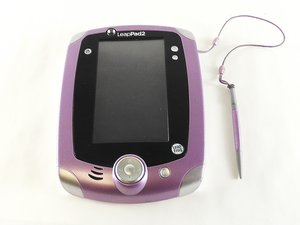
The LeapPad 2 was sold in two main color combinations: pink and green with silver accents. Special edition versions were later released in purple (LeapPad 2 Power), teal and blue (Monster’s University edition), and white and pink (Disney Princess edition).
You will see the LeapPad 2 logo printed along the center of the upper bezel above the screen. To verify your device model and serial numbers, look for the label on the back of the tablet.
USFT-SULLIVAN-F16S1G5
crwdns2931471:04crwdne2931471:0
crwdns2935297:0108crwdne2935297:0
crwdns2936751:024crwdne2936751:0 2
crwdns2936753:07crwdne2936753:0 12
crwdns2936753:030crwdne2936753:0 45
crwdns2942667:0crwdne2942667:0 4,307



