
Screen
|
crwdns2933315:03crwdne2933315:0 crwdns2934263:02crwdne2934263:0 |
Why is my calculator screen faded/black? |
|
crwdns2933315:02crwdne2933315:0 crwdns2934263:01crwdne2934263:0 |
Why are my function keys not working properly? |
|
crwdns2933313:01crwdne2933313:0 crwdns2934263:00crwdne2934263:0 |
shift and alpha button completely different functions now. |
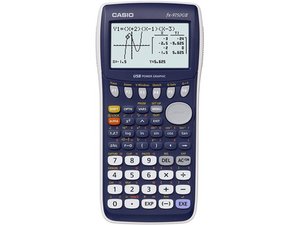
The Casio fx-9750GII is a graphing calculator sold by Casio Computer Co., Ltd. Casio is a Japanese consumer and commercial electronics manufacturer that produces calculators, mobile phones, digital cameras, electronic musical instruments, and analog and digital watches.
The Casio fx-9750GII supports over 2800 functions and is sold with a slide-on hard case. The calculator’s dot matrix display has a resolution of 64 by 128 dots. It uses a 10-digital mantissa with a 2-digit exponential display. The calculator features an icon menu that allows users to specify the desired operation by selecting an icon or inputting a number. Users can also recall previously executed formulas for editing and re-execution with the ‘multi-replay’ function.
The Casio fx-9750GII runs off of a AAA-size battery. A USB port allows data communication between the calculator and a personal computer. The calculator supports basic statistics, basic mathematical functions, table generation, data logging, intermediate statistics, financial calculations, base-n calculations, graphing, advanced statistics, differentiation, integration, equations, matrices, metric conversion functions, and complex number calculations.
The Casio fx-9750GII model can be identified by the name “Casio” printed in capital letters in the top left-hand corner of the calculator. The model name “fx-9750GII” is printed in the top right-hand corner in italicized font. The words “USB Power Graphic” are printed in capital letters underneath the center of the calculator’s digital display. This model features plastic keys.
Casio fx-9860G Series, fx-9750GII and fx-7400GII Hardware User's Guide
Casio fx-9750GII Quick Reference Card
CASIO fx-9860GII (SD), fx-9860G AU PLUS, fx-9750GII y fx-7400GII: Guía de hardware
Casio fx-9750GII Algebra 1 SneakPeek Guide
Resetting the CASIO fx-9750GII for testing purposes
Casio fx-9750GII Quick Reference Guide
Casio fx-9860GII SD/9860GII/9860G AU PLUS/9750GII/7400GII Hardware-Bedienungsanleitung
Casio fx-9860GII, fx-9860G AU PLUS, fx-9750GII et fx-7400GII — Mode d'emploi du matériel
Casio fx-9860GII SD, fx-9860GII, fx-9860G AU PLUS, fx-9750GII e fx-7400GII — Guia do Usuário 2.04
Casio fx-9860GII SD/fx-9860GII/fx-9860G AU PLUS/fx-9750GII/fx-7400GII Hardware Guia do Usuário
Casio fx-9860GII SD/9860GII, fx-9860G AU PLUS, fx-9750GII y fx-7400GII: Guía de hardware
Casio Electronic Calculators Office & School General Catalogue 2010–2011
crwdns2936751:024crwdne2936751:0 4
crwdns2936753:07crwdne2936753:0 29
crwdns2936753:030crwdne2936753:0 92
crwdns2959996:0crwdne2959996:0 4,024

