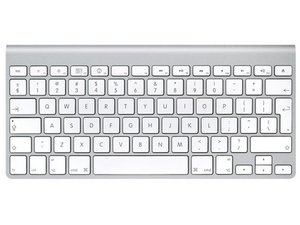
I did this teardown of the Aluminum Keyboard and was wondering what your thoughts were on cleaning it. It looks to me like I can just stick it in the dishwasher and let it dry for a couple of days if I take the power button, bluetooth board and batteries out on the wireless and just stick the wired in.
The thing I kinda wanted to show was that the keyboard was just not meant to be opened. The On/Off, and the bluetooth can be repaired as well as replacing keys but opening the body destroys it. I've had no problem washing Apples older keyboards as long as I let them dry.
Actually the dishwasher is a very good idea. I would run the dishwasher 1 time through all of it's cycles to rinse it out and remove any left over soap residue. Dishwasher soap is caustic. - Nice guide
mayer I believe the force and of water from the dishwasher will helps clean the stuck on solidified gunk. I have used a dishwasher several times to clean out keyboards that I purchased from the thrift store or were given to me. I've never had it kill one. Water itself doesn't kill. It is the contaminates in water that kill - Ionized minerals which are salts. Salts conduct electricity and are corrosive. If you live in an area with hard water buy a gallon of distilled water or water that has gone through reverse osmosis and pour it over the keyboard as it is coming out of the dishwasher that will rinse away any contaminates that are in your water.
pollytintop for your wireless keyboard try this: _______________________Delete the Library/Preferences/com.apple.keyboardtype.plist file . Turn off your computer. Hook your wireless keyboard up, making sure it has good batteries etc... Power your computer up and see if that solves your problem. I have seen this solve the problem in several cases where keys were not working or defined inaccurately.
Mine holds food quite well, thus the need for the dishwasher. Jen - how long did you let it dry? I wonder if it was killed by the spill while it was on?
It pretty much died straight off! I took the batteries out and posted on here ages ago but the consensus was it was scrappage/unopenable...dried for a few days, tried it and only asdfghjk worked.. put it in the I'll fix that later box in the cellar, couple of months ago I got it out, opened/washed/dried...numbers and middle row ok, nothing on bottom work. tried again last night..same. Not sure what would cause only centre keys to work.. will look at it again. You've inspired me!
I prefer to submerge it in Methylated spirits (batteries removed of course) for awhile then give it a burst with compressed air, leave it over night to dry (you could leave it for half an hour but I like to be sure) and its like brand new... if you do spill something on your keyboard disconnect the power or remove the batteries as quick as possible, its your best chance at salvaging it.
Modern electronic devices are absurdly reliable. My AirPods have been through the wash machine and dryer and they still work. My late 2001 iBook (Mac OSX 10.4.11, 500MHz PowerPC) drank a thermos of coffee with sugar and creamer in 2012. I took it apart, cleaned it with alcohol and that didn’t work, but using water worked perfectly. It still runs great, just booted up to be sure. I prefer its keyboard to my MacBook’s by the way. In terms of keyboards, I’ve used the top-rack-dishwasher technique on Apple’s wired keyboards pretty frequently and never had a failure. Haven’t tried wireless.
As an aside: With the dreaded Covid-19 virus running around, you may want to disinfect your devices. Clorox wipes seem to be useful. There’s a device soon to come on the market that uses ultraviolet C to disinfect your phone, remotes, etc, but it won’t do anything the size of a keyboard. It runs $100.00-plus. A UVC bulb is about $15-20 but BE CAREFUL! UVC will fry your eyes and cancerize your skin. Put it and your keyboard/CPAP mask or whatever in a box, close the box, and turn the light on remotely by plugging in an extension cord or using a switched outlet. I lined mine with aluminum foil, which reflects UVC very well. The commercial device runs five minutes. I use my home-made one for an hour at a time, which is probably over-kill. If you use this technique insure that children or unsuspecting persons of any age won’t mess with your set-up. Again, please be careful, and stay well.
Spilled some soy sauce on my A1314 wireless keyboard that caused the keys to be bit sticky. After reading this thread, I removed the BT circuitboard and went to the kitchen. Sprayd the whole keyboard with dishwashing soap, thoroughly brushed it and then rinsed it. Blowed most of the water of using air in can and then dried it with paper towel. Couldn’t bother waiting for it to dry, so I just assembled it and threw in the batteries.
Tadaa! it works (and looks) like its a brand new keyboard. Nice!

 3.9crwdns2936485:0crwdne2936485:0
  1.1crwdns2936485:0crwdne2936485:0
  2.6crwdns2936485:0crwdne2936485:0







crwdns2944067:03crwdne2944067:0
That adhesive is nasty! Took ages to pry open.. Well done for making a guide
crwdns2957956:0crwdnd2957956:0 pollytintop crwdne2957956:0
The thing I kinda wanted to show was that the keyboard was just not meant to be opened. The On/Off, and the bluetooth can be repaired as well as replacing keys but opening the body destroys it. I've had no problem washing Apples older keyboards as long as I let them dry.
crwdns2957956:0crwdnd2957956:0 mayer crwdne2957956:0
just dug out the keyboard again...the back on mine is plastic...that's why I was able to use spudgers!
crwdns2957956:0crwdnd2957956:0 pollytintop crwdne2957956:0